In honor of CARS Spotlight month, I will be doing a series of blog posts related to Academic Advisement Report configuration. This first post will focus on effective dating and how it relates to various advisement report errors (or non errors in some cases) that I have had to troubleshoot at Northern Virginia Community College (NOVA). Brian Rockwood's previous HEUG post Effective Dating in Academic Advisement covered the basic rules for how effective dates work within advisement reports. This blogpost serves as an extension to that initial article.
NOVA is a large community college with 110 active plans and around 70,000 students a year. This results in a lot of potential for errors in Advisement and Degree Audit reports. Over the four years I have served as the person primarily responsible for configuring and troubleshooting NOVA’s Advisement and degree audit reports, I have had many opportunities to become familiar with the importance of understanding effective dating and how it impacts Academic Advisement.
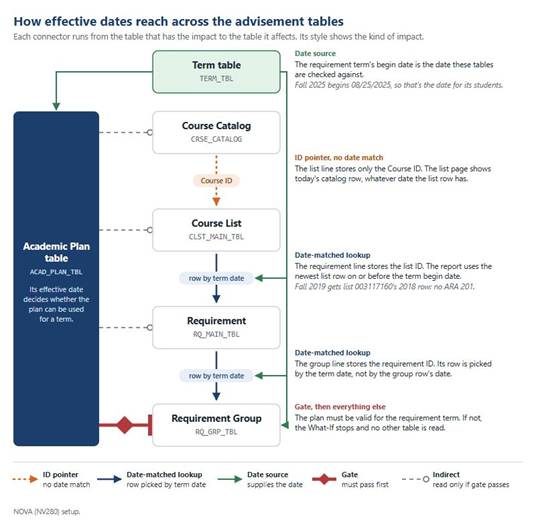
The most important tables relevant to advisement reports are the Course Catalog, the Term Table, the Academic Plan table, and then the advisement tables: Course List, Requirements, and Requirement Groups. Additional items that can impact reports are Student Group tables, Entity Groups, Milestones, and Test Components--all of which can be referenced by Academic Requirements and Requirement Groups.
The “Price is Right” rule presented by Brian Rockwood:
The report takes the student's requirement term, gets that term’s start date from the Term table, and for each requirement group, requirement and course list uses the newest row dated on or before that date. Each object is resolved separately.
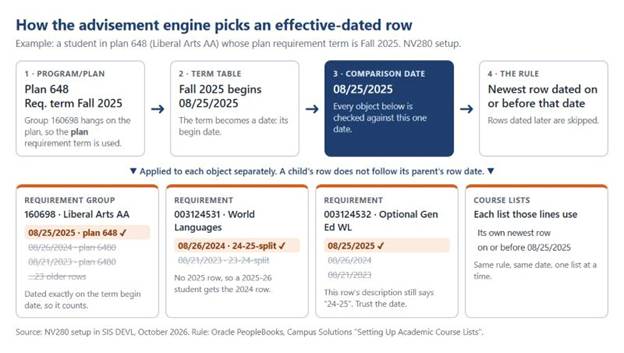
Figure 1. Term Start Date, each object resolved separately using that start date.
"This class is on the list, but it’s not slotting into the requirement!" -a short list of things that can cause this:
Course is in one catalog year but not another:
Course list 003117160 has two rows. The 2021 row added ARA 201 and 202.
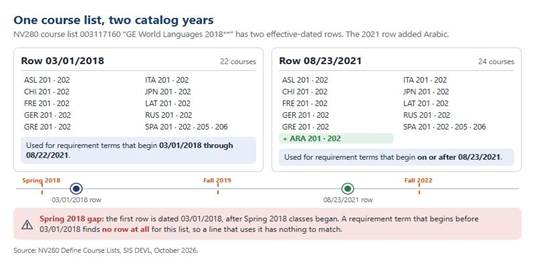
Figure 2. Course list 003117160's two rows.
Two students took ARA 201 and 202 in 2022-23. The Fall 2019 student gets the 2018 row, which has no Arabic. When the course was taken doesn't matter.
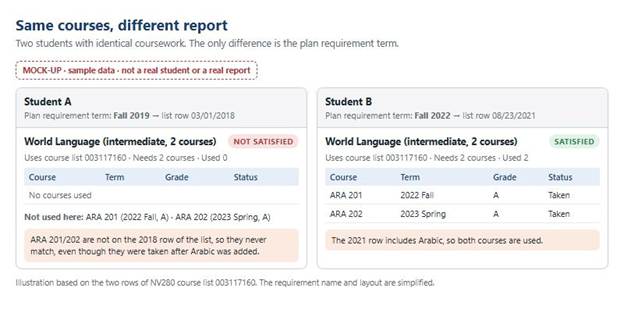
Figure 3. Mock-up (no real student).
Time restriction on a Course List:
NOVA’s Computer Science, Information Technology, and Health Science/Medical Education degrees all have time limits for their technical and science courses. Courses taken prior to that time limit can’t count towards the degree.
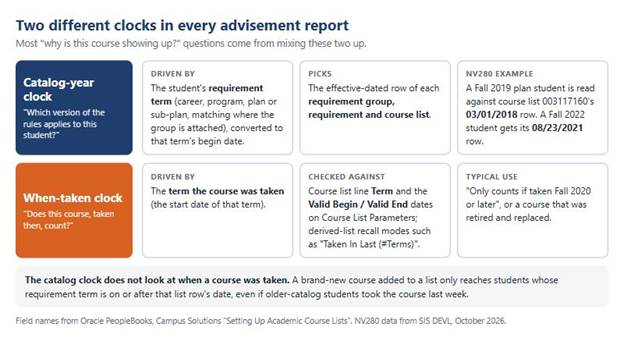
Figure 4. The catalog year picks the list row. The term taken is checked only against the line's Term and Valid Begin/End.
FIX
Add the course to the older row (Back programming), or use advisement exceptions.
A waiver stopped applying
NOVA's World Language waivers use dynamic conditions, student groups, test scores, and entity groups, are all effective dated. Check the effective dates for these items, especially in new setups if you are getting an error in a requirement line that uses these. Make sure the effective date for a new student group or test score is dated prior to start of the term in which you first use this. Consider having a “Beginning of All Time” dated foundation row for all new items in these tables, with a second effective dated row whose date signals when you actually created and started using the group. This way you can avoid problems with back programming logic to older reports while preserving accurate history.
Course in Course list isn’t active in the Catalog
When a course has been discontinued and replaced with a different course, NOVA’s policy has been to “back program” these new courses into prior catalog years to proactively reduce the need for manual overrides. This can lead to courses accidentally being added to course lists with effective dates prior to the date the course was entered into the catalog.
Course discontinued in the Catalog while plans that use it are still active.
Inactivating a course in the course catalog will make that course disappear from course lists for terms whose start date occur after the discontinuance date, even if there are plans that would still accept that course. NOVA has had to put careful thought into course discontinuance practices to allow students who took that course when active to continue using that course in degree audits until a reasonable period of time has passed. We have chosen to mark these courses as not offered for a couple academic years prior to formally discontinuing them.
What effective-dating problems have you run into? Tell us in the comments.