PS Query & SQL

 View Only
Expand all | Collapse all

In List -

  • 1.  In List -

    Posted 01-21-2025 09:56 AM

    Good Morning,

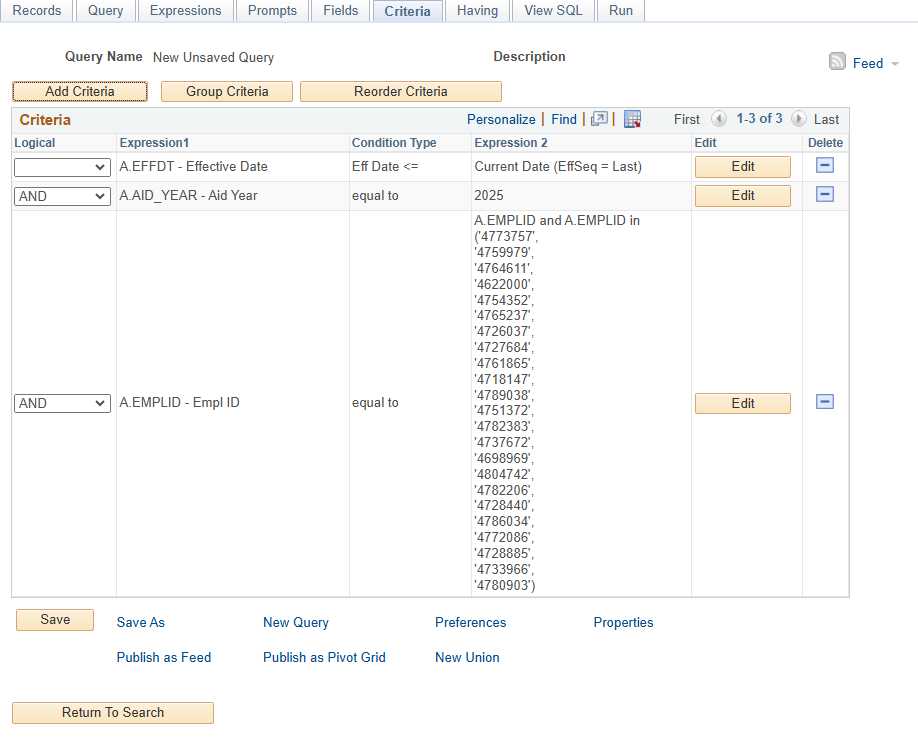
    Sharing a way in Query Manager to use expressions in the where clause that allows you to paste lists of data into your queries.  This has been very useful for when we are asked to provide data from PeopleSoft based on a list of IDs.  In my example below, I have a list of IDs that I want to pull the Primary Academic Program and Plan from STDNT_FA_TERM.  Thought I would share in the hopes of helping someone else.  
    Thank you,

    Michelle


    ------------------------------
    Michelle Jackson
    Director of Operations for Financial Aid
    University of Pittsburgh
    ------------------------------

    Message from the HEUG Marketplace:
    ------------------------------
    Find, Review, and Engage with Higher Education-focused solution providers, products, and services using the HEUG Marketplace.
    ------------------------------
    Alliance 2026 Registration is Open!


  • 2.  RE: In List -

    Posted 01-21-2025 05:02 PM

    typically, I use equal to ANY() in the expression for "in list"

    O.ITEM_TYPE - Item Type
    equal to
    ANY('522621000010', '522621000005', '510021000500', '510021000501', '510021000505', '510021000506')


    and not equal to ALL() for "not in list"

    A.ITEM_TYPE - Item Type
    not equal to
    ALL('631148400000','631244500000','631244600000','631112770000','631113460000')


    ------------------------------
    Robert Fogarty PMP
    Reporting Team Lead | LionPATH Development and Maintenance Office
    The Pennsylvania State University
    ------------------------------

    Message from the HEUG Marketplace:
    ------------------------------
    Find, Review, and Engage with Higher Education-focused solution providers, products, and services using the HEUG Marketplace.
    ------------------------------

    Alliance 2026 Registration is Open!


  • 3.  RE: In List -

    Posted 01-22-2025 08:52 AM

    Robert,

    I had no idea that these two functions existed; thank you for sharing them! I have also been using the same technique as Michelle, but ANY() and ALL() will go a long way to make our queries/SQL easier to read.

    This group is awesome! I am very excited to see all of the cool things that come out of it.

    Jeffrie


    ------------------------------
    Jeffrie Brooks
    BSA
    University of Michigan
    ------------------------------

    Message from the HEUG Marketplace:
    ------------------------------
    Find, Review, and Engage with Higher Education-focused solution providers, products, and services using the HEUG Marketplace.
    ------------------------------

    Alliance 2026 Registration is Open!


  • 4.  RE: In List -

    Posted 01-22-2025 08:58 AM

    Same!  I've never used the ANY or ALL either.


    Alliance 2026 Registration is Open!


  • 5.  RE: In List -

    Posted 01-22-2025 09:06 AM

    I haven't either!  I will have to give this one a try!  Thanks for sharing Paul's presentation too Dana!  These are great resources!


    ------------------------------
    Michelle Jackson
    Director of Operations for Financial Aid
    University of Pittsburgh
    ------------------------------

    Message from the HEUG Marketplace:
    ------------------------------
    Find, Review, and Engage with Higher Education-focused solution providers, products, and services using the HEUG Marketplace.
    ------------------------------

    Alliance 2026 Registration is Open!


  • 6.  RE: In List -

    Posted 01-22-2025 09:29 AM
    The maximum number of values in the list is 1,000 but that is per criteria. You can add additional criteria with ORs for in list (AND for not in list) and criteria grouping.

    Bob
    --
    Bob Fogarty
    LionPATH - Reporting Team Lead
    The Pennsylvania State University
    rtf12@psu.edu


    Alliance 2026 Registration is Open!


  • 7.  RE: In List -

    Posted 01-22-2025 09:44 AM

    Thanks for adding this Bob. I was about to do this yesterday, but things can easily get away from you in this business of ours.


    ------------------------------
    Daniel Labrecque
    Senior 2 Business Systems Analyst/Functional Architect
    University of Nevada, Las Vegas
    ------------------------------

    Message from the HEUG Marketplace:
    ------------------------------
    Find, Review, and Engage with Higher Education-focused solution providers, products, and services using the HEUG Marketplace.
    ------------------------------

    Alliance 2026 Registration is Open!


  • 8.  RE: In List -

    Posted 01-22-2025 10:40 AM

    Robert,

    I've never used the expressions ANY / ALL. Thanks for sharing these expressions. I've tried both the expressions for more than 1000 values for in list with ORs and criteria grouping. This is so cool and awesome!


    ------------------------------
    Glory Stephenraj
    Registrar Business Analyst
    Illinois State University
    ------------------------------

    Message from the HEUG Marketplace:
    ------------------------------
    Find, Review, and Engage with Higher Education-focused solution providers, products, and services using the HEUG Marketplace.
    ------------------------------

    Alliance 2026 Registration is Open!


  • 9.  RE: In List -

    Posted 01-22-2025 01:38 PM

    Besides lists of EMPLIDs, I have been using the 'ANY' expression also for the query against the maintenance log for bugs I am hoping to see included when IT has finished applying bugs. This is the last version of it that I have in production with the bugs I was last looking for. If I haven't seen a post from someone on bugs, I just copy all of the bug numbers (same as we do for all of the EMPLIDs) into a list, put them into Notepad ++ (usually are as a column of data), position the curser at the beginning of the first line, then run a macro I previously recorded that puts a single quote, goes to the end of the line and puts another single quote, then puts a comma, then forward-deletes (to get rid of the hard return) and then we play that till it reaches the end of the file. The I cleanup anything extra (such as an extra quote/comma set if there was a blank row at the end)--then we copy all of that and paste it into the "ANY" statement inside the opening and closing parenthesis. It is particularly useful when someone else has posted their updated query for the maintenance table, because I can then just copy what they have in the "IN" statement, and paste it into my "ANY" statement, so that I don't have to retype any of them. It also makes it easier to move between instances of databases, because when I create it in a test database, I just copy the whole "ANY" statement and go and paste it into the same query in production, and I don't have to get the query moved or recreate it.

    So it ends up looking like this on the criteria, followed by the SQL.

    SELECT A.UPDATE_ID, A.DESCR, TO_CHAR(CAST((A.DTTM_IMPORTED) AS TIMESTAMP),'YYYY-MM-DD-HH24.MI.SS.FF'), A.FIXOPRID, A.RELEASELABEL
      FROM PS_MAINTENANCE_LOG A
      WHERE ( A.UPDATE_ID = ANY('36785991','37148924','36927042','36921751','36685569','36865684','36622539','36622259','36494675','36741441','36921745','36622410','36958536','37183659','37044576','37050706','37311157','37350909','37355564','36741433','36700799','37024603','36143573','36836609','36612986','36937038','36747187','36936005','36741447','36942592','37180378','37097646','36792186','36792554','36481316','37244152','37212733','36771699','37123683','36580274'))

    And the results look like this:


    ------------------------------
    Shawn Trauntvein MPA
    PeopleSoft System Analyst for Financial Aid
    Brigham Young University
    ------------------------------

    Message from the HEUG Marketplace:
    ------------------------------
    Find, Review, and Engage with Higher Education-focused solution providers, products, and services using the HEUG Marketplace.
    ------------------------------

    Alliance 2026 Registration is Open!


  • 10.  RE: In List -

    Posted 01-21-2025 05:10 PM

    Nifty! I like this idea -- better than doing an "in list" expression and typing in all of your items. 


    ------------------------------
    Robert Bode M.B.A.
    Director of Financial Aid and MilitaryVeteran Student Services
    University of Wisconsin - River Falls
    robert.bode@uwrf.edu
    ------------------------------

    Alliance 2026 Registration is Open!


  • 11.  RE: In List -

    Posted 01-21-2025 05:13 PM
    Edited by Tiffany Yuen 01-21-2025 06:07 PM

    We do something similar to focus on a certain student population, but we use an Expression.


    ------------------------------
    Tiffany Yuen MS
    Information Technology Business/Technical Analyst
    Los Rios Community College District
    ------------------------------

    Alliance 2026 Registration is Open!


  • 12.  RE: In List -

    Posted 01-21-2025 05:34 PM
    Edited by Elizabeth O'Connor 01-22-2025 11:00 AM

    Hi all, 

    We also use something similar to this, as well:

    This allows us to copy/paste an SID string straight from excel into the expression (max 285 students). Thanks for sharing other alternatives!

    Elizabeth O'Connor


    ------------------------------
    Elizabeth O'Connor
    System Operations Manager
    University of Colorado
    ------------------------------

    Message from the HEUG Marketplace:
    ------------------------------
    Find, Review, and Engage with Higher Education-focused solution providers, products, and services using the HEUG Marketplace.
    ------------------------------

    Alliance 2026 Registration is Open!


  • 13.  RE: In List -

    Posted 01-22-2025 09:47 AM

    I have used INSTR before, but never considered to use it for this.  This is fascinating, Elizabeth.


    ------------------------------
    Daniel Labrecque
    Senior 2 Business Systems Analyst/Functional Architect
    University of Nevada, Las Vegas
    ------------------------------

    Message from the HEUG Marketplace:
    ------------------------------
    Find, Review, and Engage with Higher Education-focused solution providers, products, and services using the HEUG Marketplace.
    ------------------------------

    Alliance 2026 Registration is Open!


  • 14.  RE: In List -

    Posted 01-22-2025 11:40 AM
    I created two temporary student groups to get around your "285" max students.  One is ARTP for A&R Temporary, and FATP is Financial Aid Temporary.  

    Then, I inactivate all out of the student group once we finish pulling the data we need and reload it with the thousands of IDs we need to get the data from in PS Query for the new batch of data.  It works really well and is not hard to do, especially with the "Process Student Grouops" in the Records and Enrollment > Career and Program Information area in PS. 

    Thank you!
    Lee
     

    ----------------------------------------
    Lee Raubolt, M.S. 
    Truckee Meadows Community College
    Associate Director of Admissions & Enrollment Services
    7000 Dandini Blvd.
    RDMT 319
    Reno, NV 89512 USA
    775-674-7624


    --

    Public Records Notice: In accordance with Nevada Revised Statutes (NRS) Chapter 239, this email and responses, unless otherwise made confidential by law, may be subject to the Nevada Public Records laws and may be disclosed to the public upon request.


    Alliance 2026 Registration is Open!


  • 15.  RE: In List -

    Posted 01-23-2025 11:32 AM

    This is so smart! Nice to meet you Lea. My name is Shad I work for CSN in Admissions. I never thought about doing this, but this is such a good idea. I will need to remember this if I ever need to do large groups of queries at a time.


    ------------------------------
    Shad Taylor
    Data Analyst
    College of Southern Nevada
    ------------------------------

    Message from the HEUG Marketplace:
    ------------------------------
    Find, Review, and Engage with Higher Education-focused solution providers, products, and services using the HEUG Marketplace.
    ------------------------------

    Alliance 2026 Registration is Open!


  • 16.  RE: In List -

    Posted 01-23-2025 11:47 AM

    One thing to keep in mind with temporary student groups.  Student groups don't have effective sequences.  So you can't have more than one record on a given date. 


    When I use a temporary student group (and we maintain a few "permanent" temporary student group that we use for all sorts of purposes), I want to be able to inactivate them as soon as I'm done with them.  So when I assign the student group, I use an effective date of a few days in the past.  That way, I can inactivate it and not have to do so as a future effective dated row.  Doing it a few days in the past also allows for various mistakes without having to actually delete rows.


    Thanks!


    Vic

    ---

    Vic Goldberg

    Retiree, Temporary Employee

    University of Colorado Boulder

    Independent PeopleSoft FA Consultant


    Alliance 2026 Registration is Open!


  • 17.  RE: In List -

    Posted 01-22-2025 08:25 AM

    Michelle,

    That is a great suggestion, thanks for sharing it with the community!

    I have actually employed this same strategy recently, and it's so much easier, especially when you have a long list.

    Here's a tip: if you have a lengthy list and your formatting is incorrect-like missing single quotes around individual items or delimiting commas-you can use a bit of code in Notepad++ or other programs like Excel or Python to quickly correct the formatting. This way, you can easily copy and paste it into the expression without having to edit each item manually. My list of 100 or so emplids required this and this trick made life a whole lot easier!


    ------------------------------
    Brandon Nadeau
    Manager of Data Operations and Campus Relations
    University of Maine System
    ------------------------------

    Message from the HEUG Marketplace:
    ------------------------------
    Find, Review, and Engage with Higher Education-focused solution providers, products, and services using the HEUG Marketplace.
    ------------------------------

    Alliance 2026 Registration is Open!


  • 18.  RE: In List -

    Posted 01-22-2025 08:47 AM

    Thank you all for the additional great tips!  Here is the formula I use in excel to assist in adding the quotes and commas to make it a lot easier:

    To format the numbers in excel, if your IDs are in column B and there is a header row, you can enter the following formula in column A and copy down: 

    ="'"&B2&"',"


    ------------------------------
    Michelle Jackson
    Director of Operations for Financial Aid
    University of Pittsburgh
    ------------------------------

    Message from the HEUG Marketplace:
    ------------------------------
    Find, Review, and Engage with Higher Education-focused solution providers, products, and services using the HEUG Marketplace.
    ------------------------------

    Alliance 2026 Registration is Open!


  • 19.  RE: In List -

    Posted 01-22-2025 08:57 AM
      |   view attached

    Taking PS Query Manager to the Limit, presented by Paul Geigler from Northwestern University at Alliance 2017, does it slightly different.  I've been doing it like this and you can get slightly larger lists.  He even shows how you can create a query for users to use this with a prompt.  I love how there are multiple ways to do the same thing.  Do what works for you, but, I wanted to share this presentation because of the prompt and how you can get larger lists.    I'll make sure this gets added to the resource library if it isn't already there.


    I renamed the file so I could easily find it.


    Alliance 2026 Registration is Open!


  • 20.  RE: In List -

    Posted 01-22-2025 09:45 AM

    Dana,

    The presentation is in the Resource Center now under Alliance 2017.


    ------------------------------
    Daniel Labrecque
    Senior 2 Business Systems Analyst/Functional Architect
    University of Nevada, Las Vegas
    ------------------------------

    Message from the HEUG Marketplace:
    ------------------------------
    Find, Review, and Engage with Higher Education-focused solution providers, products, and services using the HEUG Marketplace.
    ------------------------------

    Alliance 2026 Registration is Open!


  • 21.  RE: In List -

    Posted 01-22-2025 09:56 AM
    Michele,

    I love ="'"&B2&"'," ... easier than the excel magic I was using!!!I

    also, found that by adding in D2, =CONCAT(C2:C1001), where C2:C1001 is the result for 1000 rows of "'"&B2&"',". The advantage of the CONCAT is that is just lessens the size of the criteria. Copy and paste D2

    Bob
    --
    Bob Fogarty
    LionPATH - Reporting Team Lead
    The Pennsylvania State University
    rtf12@psu.edu


    Alliance 2026 Registration is Open!


  • 22.  RE: In List -

    Posted 01-22-2025 03:13 PM

    I've done the various apostrophe/quote hacks in the past in Excel with Student IDs too for lists; I used to think, 'I'm probably the only fool doing this and I'm missing something more efficient.' It's fun to see that it's the approach many others are using too!


    ------------------------------
    Christopher Pokorny
    Manager, IT Services
    Cleveland State University
    ------------------------------

    Message from the HEUG Marketplace:
    ------------------------------
    Find, Review, and Engage with Higher Education-focused solution providers, products, and services using the HEUG Marketplace.
    ------------------------------

    Alliance 2026 Registration is Open!


  • 23.  RE: In List -

    Posted 01-22-2025 03:28 PM
    Depending on the version of Excel you are using, you can also do this through the TEXTJOIN() function. This is the one I have been using recently:

    ="'"&TEXTJOIN("','",TRUE,A2:A10)&"'"

    It doesn't require a copy down, which I have enjoyed. You just select the desired range within the formula.

    Jeffrie

    On Wed, Jan 22, 2025 at 3:13 PM Christopher Pokorny via Higher Education User Group <Mail@heug.org> wrote:
    I've done the various apostrophe/quote hacks in the past in Excel with Student IDs too for lists; I used to think, 'I'm probably the only fool...
    Higher Education User Group

    PS Query & SQL

    Post New Discussion
    Re: In List -
    Reply to Thread
    Jan 22, 2025 3:13 PM
    Christopher Pokorny

    I've done the various apostrophe/quote hacks in the past in Excel with Student IDs too for lists; I used to think, 'I'm probably the only fool doing this and I'm missing something more efficient.' It's fun to see that it's the approach many others are using too!


    ------------------------------
    Christopher Pokorny
    Manager, IT Services
    Cleveland State University
    ------------------------------

    Message from the HEUG Marketplace:
    ------------------------------
    Find, Review, and Engage with Higher Education-focused solution providers, products, and services using the HEUG Marketplace.
    ------------------------------
      Reply to Community   Reply to Sender via Email   View Thread   Recommend  


    You are subscribed to "PS Query & SQL" as jedobr@umich.edu. To change your subscriptions, go to My Subscriptions. To remove yourself from this community discussion, you can unsubscribe at any time.
    Alliance 2025 Registration Still Open!


    --
    Jeffrie Brooks | BUSINESS SYSTEM ANALYST
    UNIVERSITY OF MICHIGAN | INFORMATION AND TECHNOLOGY SERVICES
    734-647-8763 | jedobr@umich.edu


    Original Message:
    Sent: 1/22/2025 3:13:00 PM
    From: Christopher Pokorny
    Subject: RE: In List -

    I've done the various apostrophe/quote hacks in the past in Excel with Student IDs too for lists; I used to think, 'I'm probably the only fool doing this and I'm missing something more efficient.' It's fun to see that it's the approach many others are using too!


    ------------------------------
    Christopher Pokorny
    Manager, IT Services
    Cleveland State University
    ------------------------------

    Message from the HEUG Marketplace:
    ------------------------------
    Find, Review, and Engage with Higher Education-focused solution providers, products, and services using the HEUG Marketplace.
    ------------------------------

    Original Message:
    Sent: 01-22-2025 09:55 AM
    From: Robert Fogarty
    Subject: In List -

    Michele,

    I love ="'"&B2&"'," ... easier than the excel magic I was using!!!I

    also, found that by adding in D2, =CONCAT(C2:C1001), where C2:C1001 is the result for 1000 rows of "'"&B2&"',". The advantage of the CONCAT is that is just lessens the size of the criteria. Copy and paste D2

    Bob
    --
    Bob Fogarty
    LionPATH - Reporting Team Lead
    The Pennsylvania State University
    rtf12@psu.edu


    Original Message:
    Sent: 1/22/2025 8:47:00 AM
    From: Michelle Jackson
    Subject: RE: In List -

    Thank you all for the additional great tips!  Here is the formula I use in excel to assist in adding the quotes and commas to make it a lot easier:

    To format the numbers in excel, if your IDs are in column B and there is a header row, you can enter the following formula in column A and copy down: 

    ="'"&B2&"',"


    ------------------------------
    Michelle Jackson
    Director of Operations for Financial Aid
    University of Pittsburgh
    ------------------------------

    Message from the HEUG Marketplace:
    ------------------------------
    Find, Review, and Engage with Higher Education-focused solution providers, products, and services using the HEUG Marketplace.

    Original Message:
    Sent: 01-22-2025 08:24 AM
    From: Brandon Nadeau
    Subject: In List -

    Michelle,

    That is a great suggestion, thanks for sharing it with the community!

    I have actually employed this same strategy recently, and it's so much easier, especially when you have a long list.

    Here's a tip: if you have a lengthy list and your formatting is incorrect-like missing single quotes around individual items or delimiting commas-you can use a bit of code in Notepad++ or other programs like Excel or Python to quickly correct the formatting. This way, you can easily copy and paste it into the expression without having to edit each item manually. My list of 100 or so emplids required this and this trick made life a whole lot easier!


    ------------------------------
    Brandon Nadeau
    Manager of Data Operations and Campus Relations
    University of Maine System
    ------------------------------

    Message from the HEUG Marketplace:
    ------------------------------
    Find, Review, and Engage with Higher Education-focused solution providers, products, and services using the HEUG Marketplace.

    Original Message:
    Sent: 01-21-2025 09:56 AM
    From: Michelle Jackson
    Subject: In List -

    Good Morning,

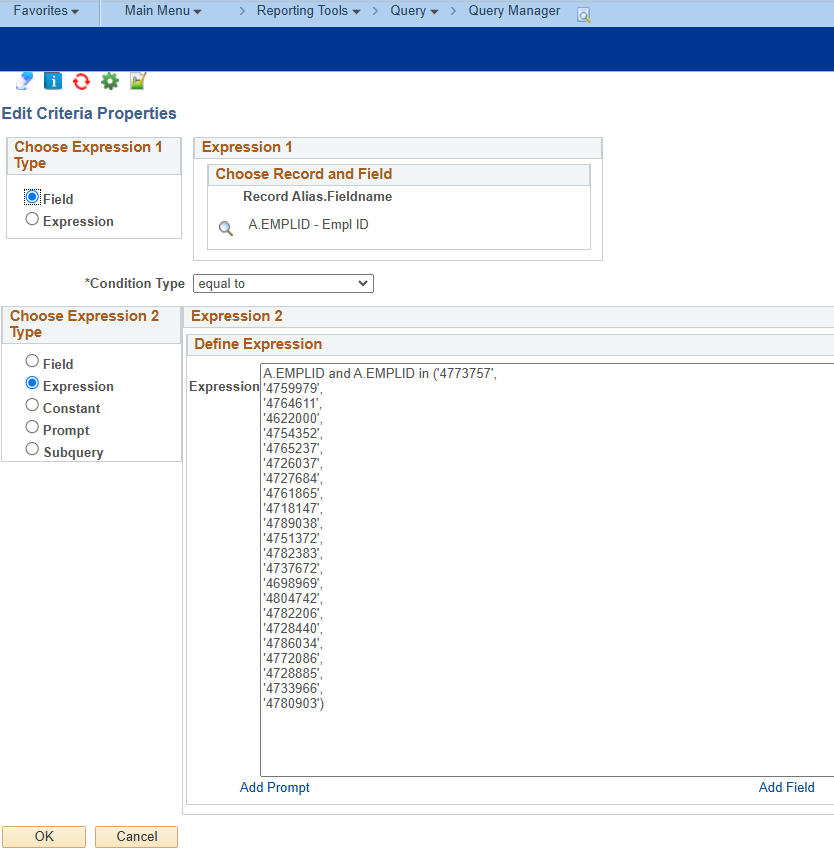
    Sharing a way in Query Manager to use expressions in the where clause that allows you to paste lists of data into your queries.  This has been very useful for when we are asked to provide data from PeopleSoft based on a list of IDs.  In my example below, I have a list of IDs that I want to pull the Primary Academic Program and Plan from STDNT_FA_TERM.  Thought I would share in the hopes of helping someone else.  
    Thank you,

    Michelle


    ------------------------------
    Michelle Jackson
    Director of Operations for Financial Aid
    University of Pittsburgh
    ------------------------------

    Message from the HEUG Marketplace:
    ------------------------------
    Find, Review, and Engage with Higher Education-focused solution providers, products, and services using the HEUG Marketplace.
    ------------------------------
    Alliance 2026 Registration is Open!


  • 24.  RE: In List -

    Posted 01-22-2025 03:37 PM

    Thanks Jeffrie, 

    That works in mind and helps me to get all IDs on one line too!


    ------------------------------
    Daniel Labrecque
    Senior 2 Business Systems Analyst/Functional Architect
    University of Nevada, Las Vegas
    ------------------------------

    Message from the HEUG Marketplace:
    ------------------------------
    Find, Review, and Engage with Higher Education-focused solution providers, products, and services using the HEUG Marketplace.
    ------------------------------

    Alliance 2026 Registration is Open!


  • 25.  RE: In List -

    Posted 06-12-2025 01:22 PM

    TEXTJOIN was introduced in Excel 2019.  So if you have a newer version of Excel (or Office 365) you have this option.

    If you have an older version of (or no) Excel, Google Sheets has the similar (and superior) JOIN function.  ="'"&JOIN("', '",A2:A10)&"'"

    Don't have (or want to use) either of those?  Before that I utilized a Macro in Microsoft Word (below) to take a copied set of cells and create the values to be pasted into an ANY() statement

    Sub PrepareAny()
    '
    ' PrepareAny Macro
    '
    '
        Selection.PasteSpecial Link:=False, DataType:=wdPasteText, Placement:= _
            wdInLine, DisplayAsIcon:=False
        Selection.WholeStory
        Selection.Find.ClearFormatting
        Selection.Find.Replacement.ClearFormatting
        With Selection.Find
            .Text = "^p"
            .Replacement.Text = "', '"
            .Forward = True
            .Wrap = wdFindAsk
            .Format = False
            .MatchCase = False
            .MatchWholeWord = False
            .MatchWildcards = False
            .MatchSoundsLike = False
            .MatchAllWordForms = False
        End With
        Selection.Find.Execute Replace:=wdReplaceAll
        Selection.MoveRight Unit:=wdCharacter, Count:=1
        Selection.TypeBackspace
        Selection.TypeBackspace
        Selection.TypeBackspace
        Selection.MoveUp Unit:=wdScreen, Count:=1
        Selection.WholeStory
        Selection.HomeKey Unit:=wdLine
        Selection.TypeText Text:="'"
        Selection.WholeStory
        Selection.Copy
    End Sub


    ------------------------------
    Scott Nishizaki
    Developer/Analyst
    Azusa Pacific University
    ------------------------------

    Message from the HEUG Marketplace:
    ------------------------------
    Find, Review, and Engage with Higher Education-focused solution providers, products, and services using the HEUG Marketplace.
    ------------------------------

    Alliance 2026 Registration is Open!


  • 26.  RE: In List -

    Posted 01-22-2025 04:02 PM

    Thanks for sharing Bob!


    ------------------------------
    Michelle Jackson
    Director of Operations for Financial Aid
    University of Pittsburgh
    ------------------------------

    Message from the HEUG Marketplace:
    ------------------------------
    Find, Review, and Engage with Higher Education-focused solution providers, products, and services using the HEUG Marketplace.
    ------------------------------

    Alliance 2026 Registration is Open!