Welcome to the first installment of “Did You Know?” brought to you by the members of the Student Records Advisory Group. I'm Caitlin Haswell, Senior Assistant Director of Enrollment Services at The Catholic University of America, and I’ll be discussing how term activation impacts the Student Records and Student Financials modules.
You might be wondering why a Student Records Advisory Group member is talking about student financials. My institution merged the Registrar and Student Accounts offices. My role in our Enrollment Services Office bridges both modules and has given me insight into how closely linked they are. (Note: For anyone less familiar with the student financials terms below, I’ve included a glossary at the end.)
One of the most common pages that impacts both modules is PeopleSoft’s Term Activation page (Navigation: Records and Enrollment > Student Term Information > Term Activate a Student). Let’s look at three areas where this interaction occurs: the Eligible to Enroll box, the Student Career Number field, and the Billing Career field.
Eligible to Enroll
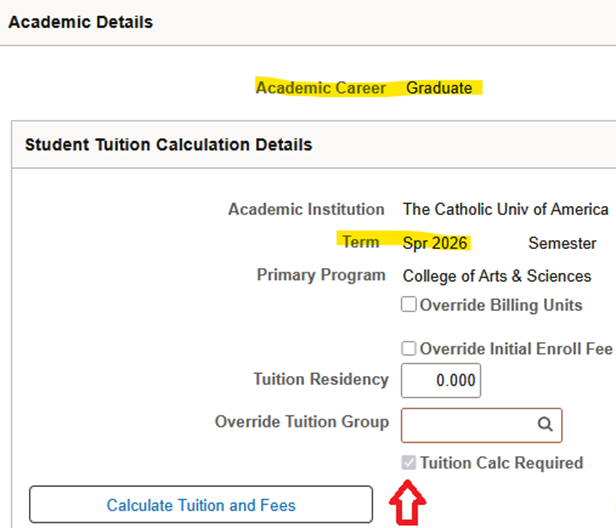
Students need to be term activated to register for a semester – this isn’t a surprise to anyone who works in records. But, did you know that term activation is also a requirement for tuition calculation1 to run? The processes your institution uses to update student records may affect how tuition calculation runs for a student.
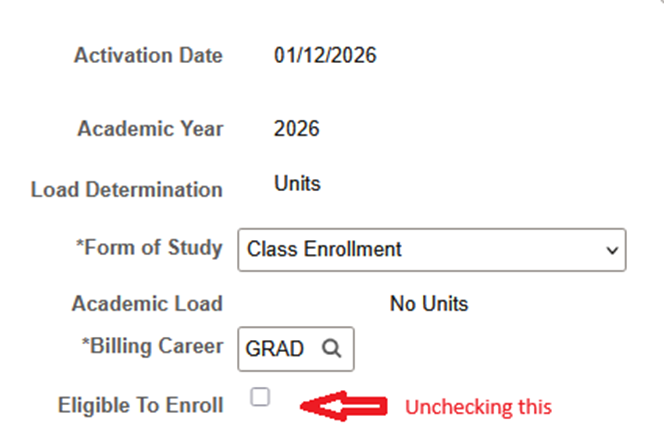
· Scenario: John Jones is enrolled for Fall 2025 and is subsequently term activated for Spring 2026. He enrolls in classes when his enrollment appointment opens. When tuition calculation turns on for Spring 2026 charges are applied to John’s account. After the fall semester ends, John needs to request an academic leave for the spring semester, so he drops his spring classes. If you’re processing his leave request before the spring semester starts or during the add/drop period, you might uncheck the Eligible to Enroll box on Spring 2026 as part of that process.
· Pain Point with Student Financials: Unchecking Eligible to Enroll also throws the tuition calculation flag2 for Spring 2026. If tuition calculation doesn’t run before his status is updated on Student Program/Plan, it could cause issues with student account refunding when he re-enrolls in future terms.
Possible Solution: Coordinate with your student accounts office to manually run tuition calculation for the student before updating the Program/Plan stack. Or, if tuition calculation runs on a nightly recurrence, update the Program/Plan stack the next day.

Student Career Number
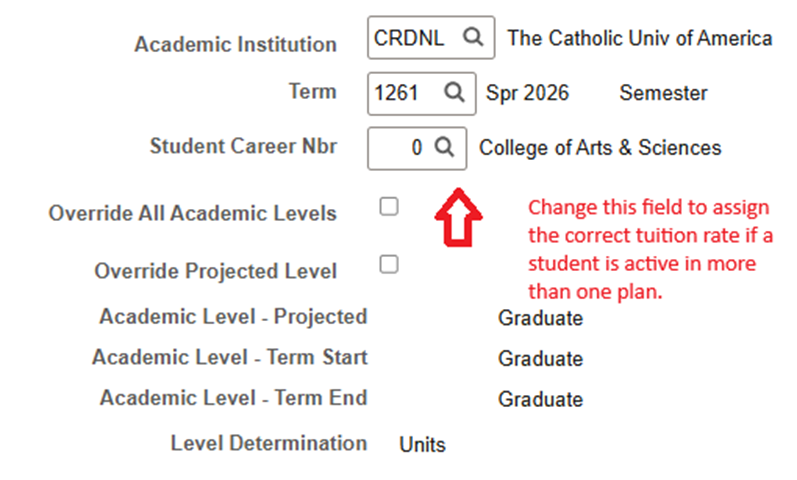
The Student Career Nbr field determines which program/plan a student’s registration is tied to and what they see as their field of study on their transcript for that semester. Did you know that if your institution bills students by academic plan, this field also determines what tuition charge goes on the student account?
· Scenario: Mary Moore is admitted as a certificate student for Fall 2025 and enrolls for classes. During the semester, she decides to apply to a degree program beginning in Spring 2026. However, before her degree application is admitted and matriculated, she is term activated for Spring 2026 under her certificate program and enrolls in classes.
· Pain Point with Student Financials: If your institution bills by academic plan, and the rates for certificate and degree plans are different, Mary will be charged an incorrect tuition rate for Spring 2026.
Solution: You can change the student career number on the term activation page for Spring 2026 to the number that corresponds to Mary’s degree program, as long as both the certificate and the degree program are offered under the same academic career. Changing this number throws the tuition calculation flag for the same semester. The next time tuition calculation runs, it will assign Mary the correct tuition rate.
Billing Career
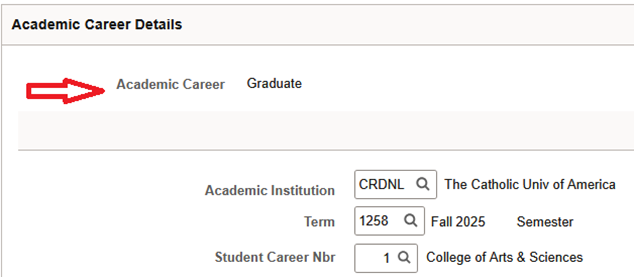
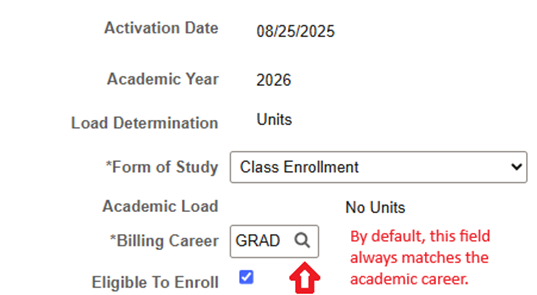
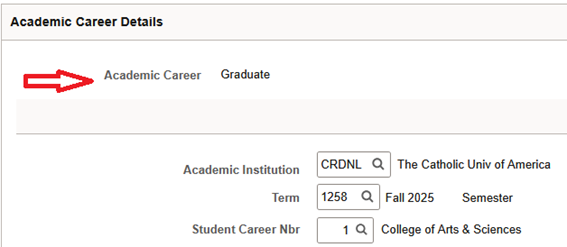
In most cases, this will be the same as the student’s academic career. But everyone who works in higher education knows that every rule has at least one exception! If your institution allows students to simultaneously enroll in two careers but only be charged one tuition rate, you can use this field to adjust tuition charges on the student account.
· Scenario: Stacy Smith is admitted to an approved joint degree program that allows her to pursue a J.D. in law and an M.A. in psychology simultaneously. As such, she has two term activation rows for Fall 2025: one under academic career law and one under academic career graduate. She enrolls for her law courses under her law academic career and her psychology courses under her graduate academic career.
· Pain Point with Student Financials: Since the default setting on term activation is to match the billing career to the academic career, Stacy has two tuition charges on her account: the law rate and the graduate rate.
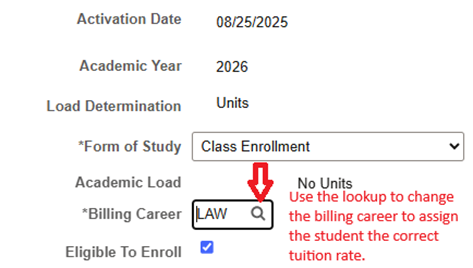
Solution: To keep Stacy from panicking about this massively expensive bill, you can change the billing career on the relevant academic career. So, if your institution bills all law joint degree students at the law rate, you can change the billing career field on the graduate academic career to law. Changing the billing career throws the tuition calculation flag for that semester. The next time tuition calculation runs, the graduate tuition charge will be removed from the account.
These are just a few simple ways to use the term activation page to minimize pain points between student records and student financials. The main takeaway is that students are better served when processes are coordinated across both modules. Happy processing!
Glossary
1Tuition Calculation: While this can mean many things, in this context, I’m referring to the PeopleSoft page that allows you to run tuition calculation for an individual student to assign and/or remove charges on a specific career and term. (Navigation: Student Financials > Tuition and Fees > Tuition Calculation)
2 Throw the Tuition Calculation Flag: Your institution might call this something else, but I’m referring to the check box on the tuition calculation page that tells the system to run tuition calculation for a student on a specific career and term.