Have you ever thought, “It would be so much easier if these queries would just tell me when something needs attention?” Welcome to the power of MyWork integrated with WorkCenters! At Cornell University, the Office of the University Registrar has been steadily expanding the use of WorkCenters across more of our teams. Along the way, we've implemented three new WorkCenters—each enhanced with MyWork—designed to centralize daily tasks, streamline monitoring, and simplify how our teams manage information in one convenient place.
What Are WorkCenters and MyWork?
WorkCenters offer a centralized hub where staff can access the tools and activities they need to complete their work efficiently.
MyWork, on the other hand, builds on this one-stop-shop concept by providing a customizable space for tracking specific tasks or data sets.
While WorkCenters are largely driven by functional design, MyWork adds a layer of technical capability—capturing targeted populations of data to help users keep an eye on approvals, alerts, items of concern, and much more.
How We Got Started
When our office first began exploring WorkCenters and MyWork, we started with a simple question: “What queries are you running regularly to track something?” That became our foundation—bringing those frequently run queries directly into MyWork.
But what about processes with no existing queries? Or brand-new workflows? That’s where the brainstorming began. We asked ourselves:
- What changes in the system do we need better visibility into?
- What tasks need ongoing monitoring?
- Where do we need proactive alerts or reminders?
- What data clean-up or follow-up work slips through the cracks?
These conversations shaped the requirements for each WorkCenter we built, ensuring each one truly supported the team’s day-to-day responsibilities.
Eager for more information?
Today’s post focuses on our functional use cases and how WorkCenters with MyWork have transformed our teams’ business processes. Curious about the technical implementation in PeopleSoft? If you’re attending Alliance 2026 in sunny Orlando (early-bird registration ends February 11th!), don’t miss the session presented by my colleague, Mark Miszewski:
Session #5738 – WorkCenters Reimagined: A Whole New World with My Work
📅 Wednesday, March 11th
🕘 9:00–10:00 AM EST
Let's dive into the WorkCenters that help the staff in our Office of the University Registrar's Office manage their day-to-day!
Test, Transfer, and Other Credits
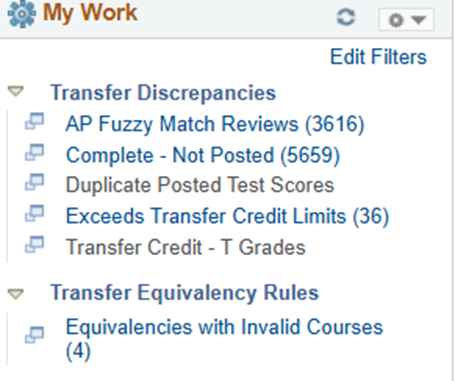
Our Credit Evaluation Services Team needed a centralized place to manage everything related to test, transfer, and other credit entries. Because some transfer evaluation tasks are handled collaboratively between the Colleges and our central office—and others are processed solely by our team—having a consolidated WorkCenter with MyWork has created a far more streamlined and efficient workflow.
With MyWork, the team can monitor and act on several areas, including:
- AP scores that have been loaded but not yet matched to a student record
- Transfer coursework that is not in a posted status
- Duplicate posted test results requiring resolution
- Students exceeding transfer credit limits according to policy
- Courses entered with a default T grade that need to be updated to the correct grade
- Course equivalencies linked to inactive courses, allowing staff to review and update mappings as needed
|
 |
NCAA/VA Tracking • Withdrawals • NSC Processing
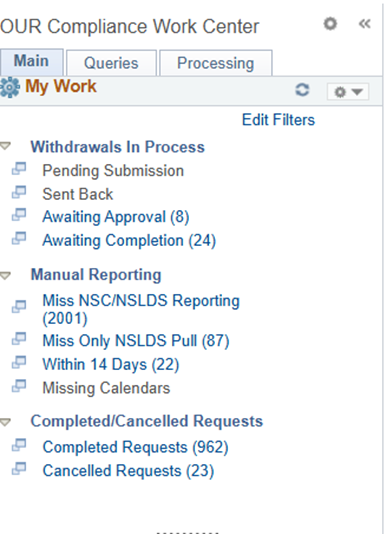
Our Compliance Team manages a wide range of processes tied to National Student Clearinghouse (NSC) reporting, withdrawals, NCAA eligibility, and VA certifications. The first group to experience the benefits of MyWork-enhanced WorkCenters were the staff members focused on withdrawals and NSC reporting.
Their WorkCenter now provides a streamlined view of:
- Withdrawals awaiting processing, sourced from our custom withdrawal tracking page (which captures information submitted through our external form).
- Manual NSC/NSLDS reporting impacts, making it easier to identify and address cases requiring special attention.
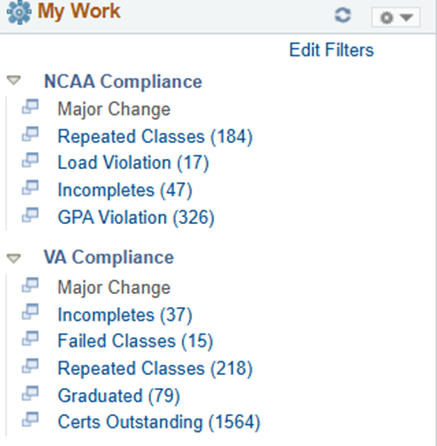
Our staff that support the NCAA and VA populations saw how MyWork simplified compliance tracking, they were eager for a WorkCenter of their own. Their NCAA/VA WorkCenter now allows them to monitor:
- Repeated coursework
- Unit loads for eligibility and certification
- Incomplete grades
- GPAs and academic standing indicators
- Major changes
- Additional compliance-sensitive data points for students identified either through VA certification pages or our NCAA student group.
|
|
Grade Collection Monitoring
Grade collection is one of the most significant and time‑sensitive processes our central office manages. In the past, our Information Support team relied on multiple queries to track grade roster creation, grade entry, and grade posting. This approach required extensive manual review and took valuable time away from assisting with tickets, answering campus questions, and supporting other daily tasks.
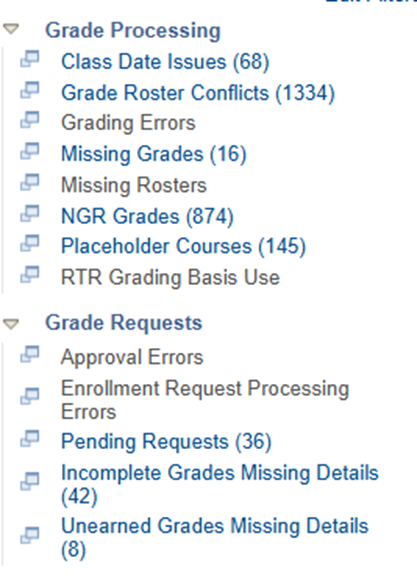
This WorkCenter’s MyWork components allow staff to monitor:
- Class date issues that may impact grading
- Grade roster conflicts
- Missing grades or missing rosters
- No Grade Reported (NGR) grades
- Additional grading exceptions and anomalies
Beyond end‑of‑term roster review, staff can also track pending Grade Change and Incomplete Requests submitted via the Faculty Center. These requests flow through our newly developed Incomplete Grades/Grade Change Requests, launched in June 2025.
|
 |
Grade Changes & Incompletes
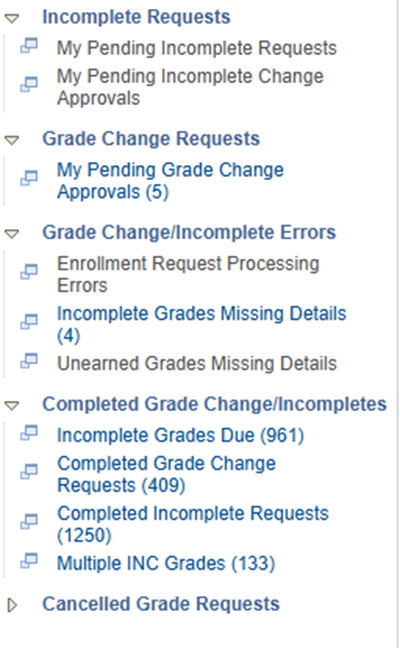
The final WorkCenter we’re highlighting today is one used primarily by our College Registrar teams. This WorkCenter—along with its MyWork components—was developed as part of a major project launched in June 2025 to transition our Grade Changes, Incompletes, and Unearned Grade Collection processes from a homegrown system into PeopleSoft.
In this WorkCenter, MyWork items populate automatically as requests move from Faculty Center submission to the student’s home college for review. User access and routing are driven through a setup table that links each staff member to their college using the Plan College Common Attribute (CAF) on the Academic Plan table.
Within this WorkCenter, College Registrar staff can:
- Approve or deny submitted requests. Approved requests trigger enrollment transactions that update or add grades directly.
- Review historical requests, giving teams full visibility into past decisions.
- Identify students with missing request details, particularly when a grade was entered administratively and requires follow-up.
- Track students with multiple Incompletes or approaching due dates, supporting timely outreach and compliance with policy.
- Access a curated set of PeopleSoft pages, external links, and queries related to grade management and other daily registrar activities.
|
 |