I am far from an expert on Composite Query, but it sounds to me like you are attacking this in the way I would. You might have to settle for some combination of hard-coding and prompts, even though that is not optimal. I will keep thinking about this, and I am interested in any further developments you discover.
Original Message:
Sent: 01-09-2026 01:57 PM
From: Susan Gutierrez
Subject: Follow Up to "Using Composite Query - Demonstration and Discussion" (07/30/2025)
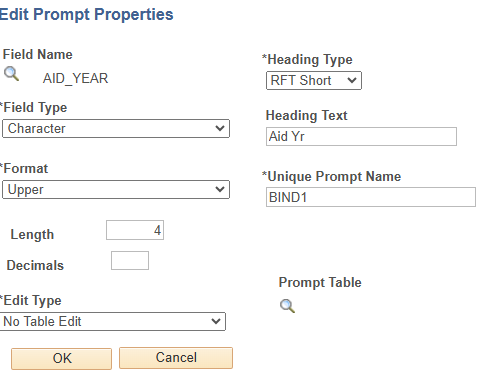
Removing AID_YEAR and STRM criteria in my base queries and adding prompts for those values in the Composite Query works, but I am having a problem with outer joins when I use prompts.
My parent base query has award data from STDNT_AWARDS, which gives me the award year amounts for each item type. Then I have two child base queries with award data from STDNT_AWRD_DISB, one for Fall and the other for Spring.
I am trying to use an outer join with the for those children to the parent base query, to show Fall values for the item type when the student has a Fall award, and Spring values when the student has a Spring award.
When I hard-code the AID_YEAR and STRM in the base queries, the outer joins work in the Composite Query and I get the award year values plus Fall and/or Spring values (if they exist) all in one row for the item type. However, when I take the hard-coded values out of the base queries and use prompts in the Composite Query, it's filtering out the rows that don't have both Fall and Spring data.
The Joins look like this: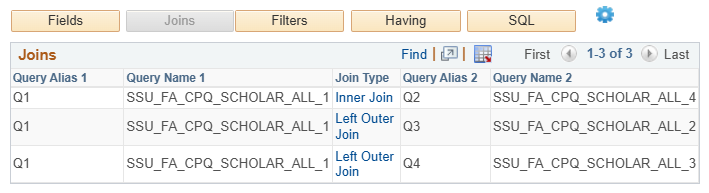
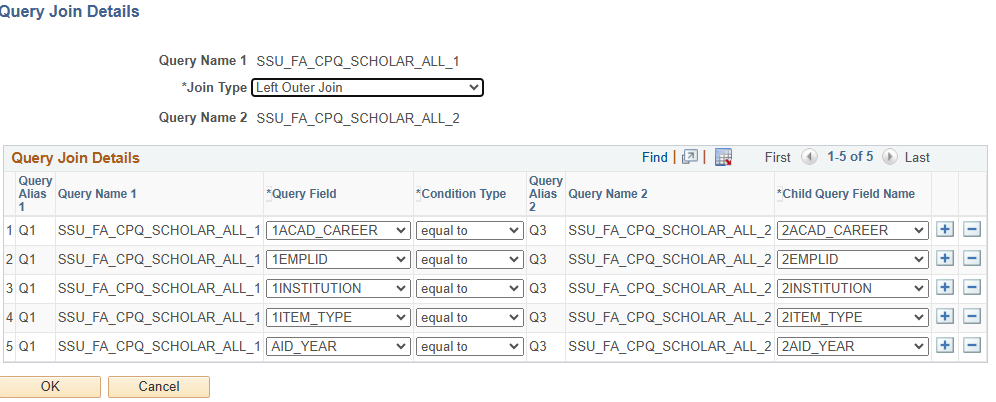
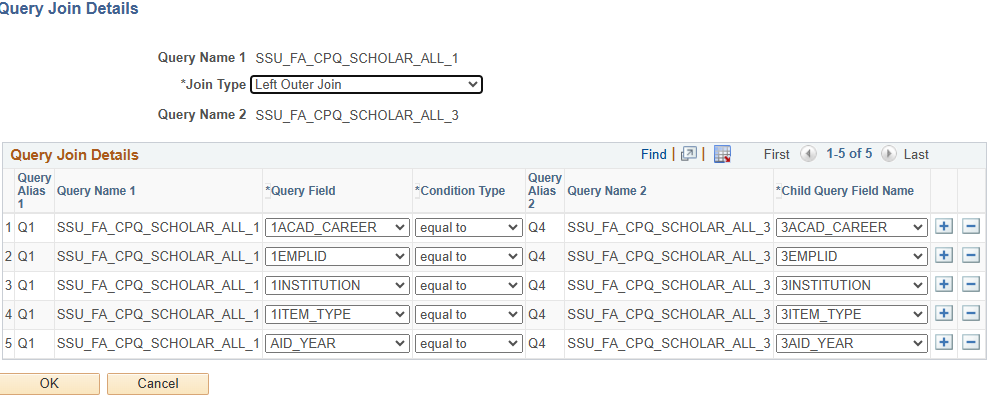
The prompts look like this:
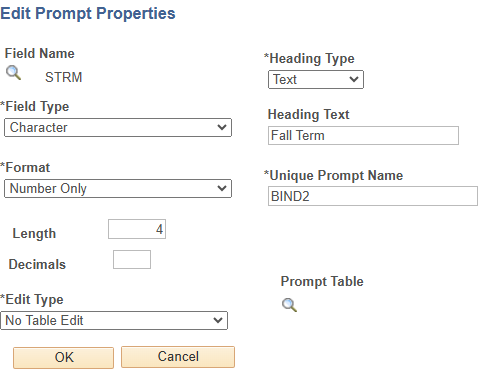
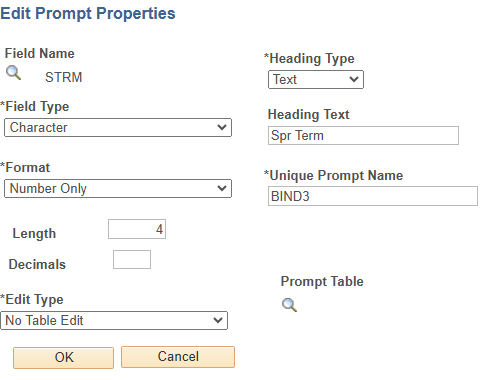
The Filters look like this:
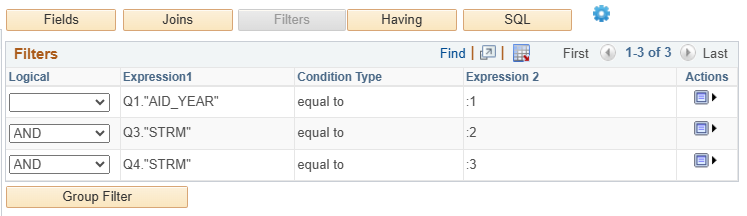
Does that give you enough to help me figure out why the prompts are causing me to lose the rows with only Fall award data or only Spring award data?
------------------------------
Susan Gutierrez
FA and SF Functional Analyst
Sonoma State University
------------------------------
Message from the HEUG Marketplace:
------------------------------
Find, Review, and Engage with Higher Education-focused solution providers, products, and services using the HEUG Marketplace.
------------------------------
Original Message:
Sent: 01-09-2026 01:33 PM
From: Tom Johnson
Subject: Follow Up to "Using Composite Query - Demonstration and Discussion" (07/30/2025)
Hey Susan - That will not work. I think that is a hallucination.
The data source/base queries should be written to be as wide as possible. They are defining the dataset. The Composite Query is where you define what the specific criteria. This is, of course, a bit of a balancing act - you clearly need to define some criteria in your data source queries - perhaps you are only interested in Undergraduate students, or loan borrowers, or some other large set of data. Establishing these baseline values in the data source query is appropriate. Then, once these data sets are combined into the Composite Query, you can add further criteria, including prompts and aggregates.
Let us know how this goes for you.
------------------------------
Tom Johnson
Sr Business Systems Analyst
Duke University
tom.johnson@duke.edu
"None of us is as smart as all of us"
Original Message:
Sent: 01-09-2026 12:59 PM
From: Susan Gutierrez
Subject: Follow Up to "Using Composite Query - Demonstration and Discussion" (07/30/2025)
Thanks for the responses!
Do you agree with Chat GPT that I should be able to have criteria in my base queries with AID_YEAR and STRM equal to a constant (not a prompt)? Then the prompts in the Composite Query override the constants in the base query criteria? Or is Chat GPT hallucinating?
------------------------------
Susan Gutierrez
FA and SF Functional Analyst
Sonoma State University
------------------------------
Message from the HEUG Marketplace:
------------------------------
Find, Review, and Engage with Higher Education-focused solution providers, products, and services using the HEUG Marketplace.
Original Message:
Sent: 01-08-2026 07:29 PM
From: Tom Johnson
Subject: Follow Up to "Using Composite Query - Demonstration and Discussion" (07/30/2025)
Dan - You beat me to it! You're so fast....but yes, I agree. You have to remove the prompts from your data-source queries, and add them at the Composite Query level.
:-)
------------------------------
Tom Johnson
Sr Business Systems Analyst
Duke University
tom.johnson@duke.edu
"None of us is as smart as all of us"
Original Message:
Sent: 01-08-2026 07:19 PM
From: Daniel Labrecque
Subject: Follow Up to "Using Composite Query - Demonstration and Discussion" (07/30/2025)
Hello Susan,
The base queries cannot have prompts in them when used in Composite Query. You must add the prompts within Composite Query itself. This is unlike Connected Query where you are allowed prompts in the base queries.
------------------------------
Daniel Labrecque
Oracle Consulting Manager
Huron Consulting Group
------------------------------
Message from the HEUG Marketplace:
------------------------------
Find, Review, and Engage with Higher Education-focused solution providers, products, and services using the HEUG Marketplace.
Original Message:
Sent: 01-08-2026 06:43 PM
From: Susan Gutierrez
Subject: Follow Up to "Using Composite Query - Demonstration and Discussion" (07/30/2025)
Regarding using prompts for AID_YEAR and STRM in a Composite Query, is it necessary to delete the AID_YEAR and STRM criteria from the base queries?
ChatGPT tells me:
CQM replaces the hard-coded value at runtime" if
The replacement happens when ALL of these match:
The base query has a hard-coded constant
The field name matches the composite prompt field
The data type matches
The composite prompt is defined for that field
However, I'm only getting the prompts recognized in the Composite Query when I delete AID_YEAR and STRM criteria from the base queries.
Thanks!
------------------------------
Susan Gutierrez
FA and SF Functional Analyst
Sonoma State University
------------------------------
Message from the HEUG Marketplace:
------------------------------
Find, Review, and Engage with Higher Education-focused solution providers, products, and services using the HEUG Marketplace.
Original Message:
Sent: 11-25-2025 08:37 AM
From: Tom Johnson
Subject: Follow Up to "Using Composite Query - Demonstration and Discussion" (07/30/2025)
Hey Susan - Yes, your understanding is correct. (Or, at least in my experience it is correct.) If you select File as the output, the only format is an Excel spreadsheet. I'm not sure if that is due to a configuration, or if that is just the way the process was designed.
It would be great to have a .csv option, since this would allow this process to be used more like an extract, with the output file ready to be consumed by whatever process.
If anyone knows anything additional about this, let us know, please. :-)
------------------------------
Tom Johnson
Sr Business Systems Analyst
Duke University
tom.johnson@duke.edu
"None of us is as smart as all of us"
Original Message:
Sent: 11-24-2025 11:53 AM
From: Susan Gutierrez
Subject: Follow Up to "Using Composite Query - Demonstration and Discussion" (07/30/2025)
Am I understanding that if we schedule a composite query and choose "File" as the output type, there is no text or csv format available?
------------------------------
Susan Gutierrez
FA and SF Functional Analyst
Sonoma State University
------------------------------
Message from the HEUG Marketplace:
------------------------------
Find, Review, and Engage with Higher Education-focused solution providers, products, and services using the HEUG Marketplace.
Original Message:
Sent: 10-14-2025 11:07 AM
From: Susan Gutierrez
Subject: Follow Up to "Using Composite Query - Demonstration and Discussion" (07/30/2025)
Thank you and Jeffrie for the resource!
My scholarship coordinator said, "This is beautiful," when she saw the composite query results without duplicates and with AY, Fall, and Spring values all in one row.
Susan
------------------------------
Susan Gutierrez
FA and SF Functional Analyst
Sonoma State University
------------------------------
Message from the HEUG Marketplace:
------------------------------
Find, Review, and Engage with Higher Education-focused solution providers, products, and services using the HEUG Marketplace.
Original Message:
Sent: 10-13-2025 03:02 PM
From: Daniel Labrecque
Subject: Follow Up to "Using Composite Query - Demonstration and Discussion" (07/30/2025)
Susan,
I was about to message you today that the best bet is to take care of the multiplying values in the base queries rather than at the Composite Query level. Seems you beat me to it! Kudos. When joining to other tables that may have multiple rows per student, it can multiply those sums.
I too have an expression that @Jeffrie Brooks came up with to handle that. I almost use it be default now. I am attaching a small write up I have of it.
------------------------------
Daniel Labrecque
Senior 2 Business Systems Analyst/Functional Architect
University of Nevada-Las Vegas
------------------------------
Message from the HEUG Marketplace:
------------------------------
Find, Review, and Engage with Higher Education-focused solution providers, products, and services using the HEUG Marketplace.
Original Message:
Sent: 10-13-2025 02:50 PM
From: Susan Gutierrez
Subject: Follow Up to "Using Composite Query - Demonstration and Discussion" (07/30/2025)
I was able to avoid the duplicate rows by taking Disbursement ID out of the child queries and using an expression in the child queries to sum the disbursements per item type.
Thanks for the help!
Susan
------------------------------
Susan Gutierrez
FA and SF Functional Analyst
Sonoma State University
------------------------------
Message from the HEUG Marketplace:
------------------------------
Find, Review, and Engage with Higher Education-focused solution providers, products, and services using the HEUG Marketplace.
Original Message:
Sent: 10-11-2025 10:26 AM
From: Susan Gutierrez
Subject: Follow Up to "Using Composite Query - Demonstration and Discussion" (07/30/2025)
It would be fine to sum the disbursements for each term. So far, I have tried two methods...
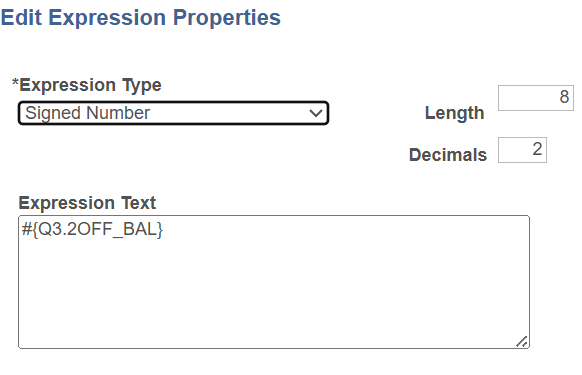
Method #1: I tried creating an expression for each of the term amount fields (Offered, Accepted, Disbursed) and using those in the Fields instead of the term amount fields, which resulted in just one row for the student's scholarship (yay!) but the amounts are double what they should be.
The expression looks like this (and I had to choose Aggregate Sum in the field properties):
I didn't save the SQL from Method 1, but I could recreate that and include it in another post if that would help.
Method #2: Instead of using the expressions in the Fields, I tried choosing Aggregate Sum in the field properties for each of the term amount fields, and again I got one row for the student's scholarship but the term amounts were doubled.
(I also tried taking the fields from FA Term for Academic Plan and Career out of the Fields, but the term amounts still doubled.)
Here is the SQL for Method 2:
SELECT DISTINCT Q1."1EMPLID",
Q1."1NAME",
Q1."1EMAIL_ADDR",
Q1."1TEM_TYPE",
Q2."4IT_DESCR",
Q2."4FUND_CODE",
Q2."4DEPTID",
Q1."1OFF_AMT",
Q1."1ACC_AMT",
Q1."1DISB_AMT",
SUM(Q3."2OFF_BAL"),
SUM(Q3."2ACC_BAL"),
SUM(Q3."2DISB_BAL"),
Q3."2ACAD__PLAN",
Q3."2ACAD_CAREER",
SUM(Q4."3OFF_BAL"),
SUM(Q4."3ACC_BAL"),
SUM(Q4."3DISB_BAL"),
Q4."3ACAD_PLAN",
Q4."3ACAD_CAREER"
FROM
(SELECT DISTINCT A.EMPLID AS "1EMPLID",
B.NAME AS "1NAME",
C.EMAIL_ADDR AS "1EMAIL_ADDR",
A.ITEM_TYPE AS "1TEM_TYPE",
A.OFFER_AMOUNT AS "1OFF_AMT",
A.ACCEPT_AMOUNT AS "1ACC_AMT",
A.DISBURSED_AMOUNT AS "1DISB_AMT",
A.ACAD_CAREER AS "1ACAD_CAREER",
A.INSTITUTION AS "1INSTITUTION",
A.AID_YEAR AS "1AID_YEAR"
FROM PS_STDNT_AWARDS A,
(PS_SCC_PERDATA_QVW B LEFT OUTER
JOIN
PS_SCC_EMAIL_QVW C
ON
B.EMPLID = C.EMPLID AND C.E_ADDR_TYPE = 'OCMP' )
WHERE ( A.INSTITUTION = 'SOCMP'
AND A.AID_YEAR = '2026'
AND ( A.ITEM_TYPE BETWEEN '800000000000' AND '800000099999'
OR A.ITEM_TYPE IN ('840000004500','840000004501','840000005300'))
AND A.EMPLID = B.EMPLID
AND A.OFFER_AMOUNT > 0) ) Q1
JOIN
( SELECT B.DESCR AS "4IT_DESCR",
E.FUND_CODE AS "4FUND_CODE",
E.DEPTID AS "4DEPTID",
B.SETID AS "4SETID",
B.ITEM_TYPE AS "4ITEM_TYPE",
B.EFFDT AS "4EFFDT",
B.EFF_STATUS AS "4EFF_STATUS",
C.STRM AS "4STRM",
C.EFFDT AS "4GL_EFFDT",
C.EFF_STATUS AS "4GL_EFF_STATUS"
FROM PS_ITEM_TYPE_1_TBL A,
PS_ITEM_TYPE_TBL B,
PS_GL_INT_DT_TBL C,
PS_GL_INTERFACE E
WHERE ( B.SETID = A.SETID
AND B.ITEM_TYPE = A.ITEM_TYPE
AND C.SETID = A.SETID
AND C.ITEM_TYPE = A.ITEM_TYPE
AND ( B.EFFDT =
(SELECT MAX(B_ED.EFFDT) FROM PS_ITEM_TYPE_TBL B_ED
WHERE B.SETID = B_ED.SETID
AND B.ITEM_TYPE = B_ED.ITEM_TYPE
AND B_ED.EFFDT <= SYSDATE)
AND A.SETID = 'SOCMP'
AND ( A.ITEM_TYPE BETWEEN '800000000000' AND '800000099999'
OR A.ITEM_TYPE IN ('840000004500','840000004501','840000005300'))
AND B.EFF_STATUS = 'A'
AND C.EFFDT =
(SELECT MAX(C_ED.EFFDT) FROM PS_GL_INT_DT_TBL C_ED
WHERE C.SETID = C_ED.SETID
AND C.ITEM_TYPE = C_ED.ITEM_TYPE
AND C.STRM = C_ED.STRM
AND C.SESSION_CODE = C_ED.SESSION_CODE
AND C_ED.EFFDT <= SYSDATE)
AND C.STRM = (SELECT MAX( D.STRM)
FROM PS_GL_INT_DT_TBL D
WHERE D.EFFDT =
(SELECT MAX(D_ED.EFFDT) FROM PS_GL_INT_DT_TBL D_ED
WHERE D.SETID = D_ED.SETID
AND D.ITEM_TYPE = D_ED.ITEM_TYPE
AND D.STRM = D_ED.STRM
AND D.SESSION_CODE = D_ED.SESSION_CODE
AND D_ED.EFFDT <= SYSDATE)
AND D.SETID = C.SETID
AND D.ITEM_TYPE = C.ITEM_TYPE)
AND A.SETID = E.SETID
AND A.ITEM_TYPE = E.ITEM_TYPE
AND E.EFFDT =
(SELECT MAX(E_ED.EFFDT) FROM PS_GL_INTERFACE E_ED
WHERE E.SETID = E_ED.SETID
AND E.ITEM_TYPE = E_ED.ITEM_TYPE
AND E.STRM = E_ED.STRM
AND E.SESSION_CODE = E_ED.SESSION_CODE
AND E_ED.EFFDT <= SYSDATE)
AND E.DB_CR_IND = 'D'
AND E.STRM = C.STRM )) ) Q2
ON
Q1."1TEM_TYPE" = Q2."4ITEM_TYPE" LEFT OUTER
JOIN
( SELECT DISTINCT A.STRM AS "2STRM",
A.ITEM_TYPE AS "2ITEM_TYPE",
A.DISBURSEMENT_ID AS "2DISB_ID",
A.OFFER_BALANCE AS "2OFF_BAL",
A.ACCEPT_BALANCE AS "2ACC_BAL",
A.DISBURSED_BALANCE AS "2DISB_BAL",
B.DESCR AS "2ACAD__PLAN",
A.EMPLID AS "2EMPLID",
A.ACAD_CAREER AS "2ACAD_CAREER",
A.AID_YEAR AS "2AID_YEAR",
A.INSTITUTION AS "2INSTITUTION"
FROM ((PS_STDNT_AWRD_DISB A LEFT OUTER
JOIN
PS_STDNT_FA_TERM C
ON
A.EMPLID = C.EMPLID AND A.INSTITUTION = C.INSTITUTION AND A.AID_YEAR = C.AID_YEAR AND A.ACAD_CAREER = C.ACAD_CAREER AND C.STRM = A.STRM AND C.EFFDT =
(SELECT MAX(C_ED.EFFDT) FROM PS_STDNT_FA_TERM C_ED
WHERE C.EMPLID = C_ED.EMPLID
AND C.INSTITUTION = C_ED.INSTITUTION
AND C.STRM = C_ED.STRM
AND C_ED.EFFDT <= SYSDATE)
AND C.EFFSEQ =
(SELECT MAX(C_ES.EFFSEQ) FROM PS_STDNT_FA_TERM C_ES
WHERE C.EMPLID = C_ES.EMPLID
AND C.INSTITUTION = C_ES.INSTITUTION
AND C.STRM = C_ES.STRM
AND C.EFFDT = C_ES.EFFDT) ) LEFT OUTER
JOIN
PS_ACAD_PLAN_TB_VW B
ON
C.INSTITUTION = B.INSTITUTION AND B.ACAD_PLAN = C.ACAD_PLAN )
WHERE ( A.INSTITUTION = 'SOCMP'
AND A.AID_YEAR = '2026'
AND ( A.ITEM_TYPE BETWEEN '800000000000' AND '800000099999'
OR A.ITEM_TYPE IN ('840000004500','840000004501','840000005300'))
AND A.STRM = '2257'
AND A.OFFER_BALANCE > 0) ) Q3
ON
Q1."1EMPLID" = Q3."2EMPLID" AND Q1."1ACAD_CAREER" = Q3."2ACAD_CAREER" AND Q1."1INSTITUTION" = Q3."2INSTITUTION" AND Q1."1AID_YEAR" = Q3."2AID_YEAR" AND Q1."1TEM_TYPE" = Q3."2ITEM_TYPE" LEFT OUTER
JOIN
( SELECT DISTINCT A.STRM AS "3STRM",
A.ITEM_TYPE AS "3ITEM_TYPE",
A.DISBURSEMENT_ID AS "3DISB_ID",
A.OFFER_BALANCE AS "3OFF_BAL",
A.ACCEPT_BALANCE AS "3ACC_BAL",
A.DISBURSED_BALANCE AS "3DISB_BAL",
B.DESCR AS "3ACAD_PLAN",
A.EMPLID AS "3EMPLID",
A.ACAD_CAREER AS "3ACAD_CAREER",
A.AID_YEAR AS "3AID_YEAR",
A.INSTITUTION AS "3INSTITUTION"
FROM ((PS_STDNT_AWRD_DISB A LEFT OUTER
JOIN
PS_STDNT_FA_TERM C
ON
A.EMPLID = C.EMPLID AND A.INSTITUTION = C.INSTITUTION AND A.AID_YEAR = C.AID_YEAR AND A.ACAD_CAREER = C.ACAD_CAREER AND C.STRM = A.STRM AND C.EFFDT =
(SELECT MAX(C_ED.EFFDT) FROM PS_STDNT_FA_TERM C_ED
WHERE C.EMPLID = C_ED.EMPLID
AND C.INSTITUTION = C_ED.INSTITUTION
AND C.STRM = C_ED.STRM
AND C_ED.EFFDT <= SYSDATE)
AND C.EFFSEQ =
(SELECT MAX(C_ES.EFFSEQ) FROM PS_STDNT_FA_TERM C_ES
WHERE C.EMPLID = C_ES.EMPLID
AND C.INSTITUTION = C_ES.INSTITUTION
AND C.STRM = C_ES.STRM
AND C.EFFDT = C_ES.EFFDT) ) LEFT OUTER
JOIN
PS_ACAD_PLAN_TB_VW B
ON
C.INSTITUTION = B.INSTITUTION AND B.ACAD_PLAN = C.ACAD_PLAN )
WHERE ( A.INSTITUTION = 'SOCMP'
AND A.AID_YEAR = '2026'
AND ( A.ITEM_TYPE BETWEEN '800000000000' AND '800000099999'
OR A.ITEM_TYPE IN ('840000004500','840000004501','840000005300'))
AND A.STRM = '2263'
AND A.OFFER_BALANCE > 0) ) Q4
ON
Q1."1EMPLID" = Q4."3EMPLID" AND Q1."1ACAD_CAREER" = Q4."3ACAD_CAREER" AND Q1."1INSTITUTION" = Q4."3INSTITUTION" AND Q1."1AID_YEAR" = Q4."3AID_YEAR" AND Q1."1TEM_TYPE" = Q4."3ITEM_TYPE"
GROUP BY Q1."1EMPLID",
Q1."1NAME",
Q1."1EMAIL_ADDR",
Q1."1TEM_TYPE",
Q2."4IT_DESCR",
Q2."4FUND_CODE",
Q2."4DEPTID",
Q1."1OFF_AMT",
Q1."1ACC_AMT",
Q1."1DISB_AMT",
Q3."2ACAD_CAREER",
Q3."2ACAD__PLAN",
Q4."3ACAD_PLAN",
Q4."3ACAD_CAREER"
ORDER BY Q1."1NAME" ASC
Actions
Query Selected Collapsible section Query Selected
Query Fields
Expand Query Name : SSU_FA_CPQ_SCHOLAR_ALL_1 Q1
Menu
Expand Query Name : SSU_FA_CPQ_SCHOLAR_ALL_4 Q2
Menu
Expand Query Name : SSU_FA_CPQ_SCHOLAR_ALL_2 Q3
Menu
Expand Query Name : SSU_FA_CPQ_SCHOLAR_ALL_3 Q4
Menu
Expressions Collapsible section Expressions
------------------------------
Susan Gutierrez
FA and SF Functional Analyst
Sonoma State University
------------------------------
Message from the HEUG Marketplace:
------------------------------
Find, Review, and Engage with Higher Education-focused solution providers, products, and services using the HEUG Marketplace.
Original Message:
Sent: 10-10-2025 07:46 PM
From: Daniel Labrecque
Subject: Follow Up to "Using Composite Query - Demonstration and Discussion" (07/30/2025)
Susan,
Does your Composite Query need to show each disbursement for a term or can you do a sum per term?
------------------------------
Daniel Labrecque
Senior 2 Business Systems Analyst/Functional Architect
University of Nevada-Las Vegas
------------------------------
Message from the HEUG Marketplace:
------------------------------
Find, Review, and Engage with Higher Education-focused solution providers, products, and services using the HEUG Marketplace.
Original Message:
Sent: 10-10-2025 01:28 PM
From: Susan Gutierrez
Subject: Follow Up to "Using Composite Query - Demonstration and Discussion" (07/30/2025)
Thanks to your wonderful webinar, I was able to create a composite query for our scholarship coordinator that has one row for each scholarship awarded with both Fall disbursement and Spring disbursement data in one row...yay!
One issue I haven't figured out is what to do with scholarships that have more than one disbursement per term. The output of my current composite query is producing 4 rows instead of one...one row for the first Fall disbursement with the first Spring disbursement data, a second row for the first Fall disbursement with the second Spring disbursement data, a third row for the second Fall disbursement with the first Spring disbursement data, and a fourth row for the second Fall disbursement with the second Spring disbursement data.
Ideally, there would be a column in the output for each of those second disbursements...all on one row.
Here is the SQL:
SELECT DISTINCT Q1."1EMPLID",
Q1."1NAME",
Q1."1EMAIL_ADDR",
Q1."1TEM_TYPE",
Q2."4IT_DESCR",
Q2."4FUND_CODE",
Q2."4DEPTID",
Q3."2STRM",
Q3."2DISB_ID",
Q3."2OFF_BAL",
Q3."2ACC_BAL",
Q3."2DISB_BAL",
Q3."2ACAD__PLAN",
Q3."2ACAD_CAREER",
Q4."3STRM",
Q4."3DISB_ID",
Q4."3OFF_BAL",
Q4."3ACC_BAL",
Q4."3DISB_BAL",
Q4."3ACAD_PLAN",
Q4."3ACAD_CAREER"
FROM
(SELECT DISTINCT A.EMPLID AS "1EMPLID",
B.NAME AS "1NAME",
C.EMAIL_ADDR AS "1EMAIL_ADDR",
A.ITEM_TYPE AS "1TEM_TYPE",
A.ACAD_CAREER AS "1ACAD_CAREER",
A.INSTITUTION AS "1INSTITUTION",
A.AID_YEAR AS "1AID_YEAR"
FROM PS_STDNT_AWARDS A,
(PS_SCC_PERDATA_QVW B LEFT OUTER
JOIN
PS_SCC_EMAIL_QVW C
ON
B.EMPLID = C.EMPLID AND C.E_ADDR_TYPE = 'OCMP' )
WHERE ( A.INSTITUTION = 'SOCMP'
AND A.AID_YEAR = '2026'
AND ( A.ITEM_TYPE BETWEEN '800000000000' AND '800000099999'
OR A.ITEM_TYPE IN ('840000004500','840000004501','840000005300'))
AND A.EMPLID = B.EMPLID
AND A.OFFER_AMOUNT > 0) ) Q1
JOIN
( SELECT B.DESCR AS "4IT_DESCR",
E.FUND_CODE AS "4FUND_CODE",
E.DEPTID AS "4DEPTID",
B.SETID AS "4SETID",
B.ITEM_TYPE AS "4ITEM_TYPE",
B.EFFDT AS "4EFFDT",
B.EFF_STATUS AS "4EFF_STATUS",
C.STRM AS "4STRM",
C.EFFDT AS "4GL_EFFDT",
C.EFF_STATUS AS "4GL_EFF_STATUS"
FROM PS_ITEM_TYPE_1_TBL A,
PS_ITEM_TYPE_TBL B,
PS_GL_INT_DT_TBL C,
PS_GL_INTERFACE E
WHERE ( B.SETID = A.SETID
AND B.ITEM_TYPE = A.ITEM_TYPE
AND C.SETID = A.SETID
AND C.ITEM_TYPE = A.ITEM_TYPE
AND ( B.EFFDT =
(SELECT MAX(B_ED.EFFDT) FROM PS_ITEM_TYPE_TBL B_ED
WHERE B.SETID = B_ED.SETID
AND B.ITEM_TYPE = B_ED.ITEM_TYPE
AND B_ED.EFFDT <= SYSDATE)
AND A.SETID = 'SOCMP'
AND ( A.ITEM_TYPE BETWEEN '800000000000' AND '800000099999'
OR A.ITEM_TYPE IN ('840000004500','840000004501','840000005300'))
AND B.EFF_STATUS = 'A'
AND C.EFFDT =
(SELECT MAX(C_ED.EFFDT) FROM PS_GL_INT_DT_TBL C_ED
WHERE C.SETID = C_ED.SETID
AND C.ITEM_TYPE = C_ED.ITEM_TYPE
AND C.STRM = C_ED.STRM
AND C.SESSION_CODE = C_ED.SESSION_CODE
AND C_ED.EFFDT <= SYSDATE)
AND C.STRM = (SELECT MAX( D.STRM)
FROM PS_GL_INT_DT_TBL D
WHERE D.EFFDT =
(SELECT MAX(D_ED.EFFDT) FROM PS_GL_INT_DT_TBL D_ED
WHERE D.SETID = D_ED.SETID
AND D.ITEM_TYPE = D_ED.ITEM_TYPE
AND D.STRM = D_ED.STRM
AND D.SESSION_CODE = D_ED.SESSION_CODE
AND D_ED.EFFDT <= SYSDATE)
AND D.SETID = C.SETID
AND D.ITEM_TYPE = C.ITEM_TYPE)
AND A.SETID = E.SETID
AND A.ITEM_TYPE = E.ITEM_TYPE
AND E.EFFDT =
(SELECT MAX(E_ED.EFFDT) FROM PS_GL_INTERFACE E_ED
WHERE E.SETID = E_ED.SETID
AND E.ITEM_TYPE = E_ED.ITEM_TYPE
AND E.STRM = E_ED.STRM
AND E.SESSION_CODE = E_ED.SESSION_CODE
AND E_ED.EFFDT <= SYSDATE)
AND E.DB_CR_IND = 'D'
AND E.STRM = C.STRM )) ) Q2
ON
Q1."1TEM_TYPE" = Q2."4ITEM_TYPE" LEFT OUTER
JOIN
( SELECT DISTINCT A.STRM AS "2STRM",
A.ITEM_TYPE AS "2ITEM_TYPE",
A.DISBURSEMENT_ID AS "2DISB_ID",
A.OFFER_BALANCE AS "2OFF_BAL",
A.ACCEPT_BALANCE AS "2ACC_BAL",
A.DISBURSED_BALANCE AS "2DISB_BAL",
B.DESCR AS "2ACAD__PLAN",
A.EMPLID AS "2EMPLID",
A.ACAD_CAREER AS "2ACAD_CAREER",
A.AID_YEAR AS "2AID_YEAR",
A.INSTITUTION AS "2INSTITUTION"
FROM ((PS_STDNT_AWRD_DISB A LEFT OUTER
JOIN
PS_STDNT_FA_TERM C
ON
A.EMPLID = C.EMPLID AND A.INSTITUTION = C.INSTITUTION AND A.AID_YEAR = C.AID_YEAR AND A.ACAD_CAREER = C.ACAD_CAREER AND C.STRM = A.STRM AND C.EFFDT =
(SELECT MAX(C_ED.EFFDT) FROM PS_STDNT_FA_TERM C_ED
WHERE C.EMPLID = C_ED.EMPLID
AND C.INSTITUTION = C_ED.INSTITUTION
AND C.STRM = C_ED.STRM
AND C_ED.EFFDT <= SYSDATE)
AND C.EFFSEQ =
(SELECT MAX(C_ES.EFFSEQ) FROM PS_STDNT_FA_TERM C_ES
WHERE C.EMPLID = C_ES.EMPLID
AND C.INSTITUTION = C_ES.INSTITUTION
AND C.STRM = C_ES.STRM
AND C.EFFDT = C_ES.EFFDT) ) LEFT OUTER
JOIN
PS_ACAD_PLAN_TB_VW B
ON
C.INSTITUTION = B.INSTITUTION AND B.ACAD_PLAN = C.ACAD_PLAN )
WHERE ( A.INSTITUTION = 'SOCMP'
AND A.AID_YEAR = '2026'
AND ( A.ITEM_TYPE BETWEEN '800000000000' AND '800000099999'
OR A.ITEM_TYPE IN ('840000004500','840000004501','840000005300'))
AND A.STRM = '2257'
AND A.OFFER_BALANCE > 0) ) Q3
ON
Q1."1EMPLID" = Q3."2EMPLID" AND Q1."1ACAD_CAREER" = Q3."2ACAD_CAREER" AND Q1."1INSTITUTION" = Q3."2INSTITUTION" AND Q1."1AID_YEAR" = Q3."2AID_YEAR" AND Q1."1TEM_TYPE" = Q3."2ITEM_TYPE" LEFT OUTER
JOIN
( SELECT DISTINCT A.STRM AS "3STRM",
A.ITEM_TYPE AS "3ITEM_TYPE",
A.DISBURSEMENT_ID AS "3DISB_ID",
A.OFFER_BALANCE AS "3OFF_BAL",
A.ACCEPT_BALANCE AS "3ACC_BAL",
A.DISBURSED_BALANCE AS "3DISB_BAL",
B.DESCR AS "3ACAD_PLAN",
A.EMPLID AS "3EMPLID",
A.ACAD_CAREER AS "3ACAD_CAREER",
A.AID_YEAR AS "3AID_YEAR",
A.INSTITUTION AS "3INSTITUTION"
FROM ((PS_STDNT_AWRD_DISB A LEFT OUTER
JOIN
PS_STDNT_FA_TERM C
ON
A.EMPLID = C.EMPLID AND A.INSTITUTION = C.INSTITUTION AND A.AID_YEAR = C.AID_YEAR AND A.ACAD_CAREER = C.ACAD_CAREER AND C.STRM = A.STRM AND C.EFFDT =
(SELECT MAX(C_ED.EFFDT) FROM PS_STDNT_FA_TERM C_ED
WHERE C.EMPLID = C_ED.EMPLID
AND C.INSTITUTION = C_ED.INSTITUTION
AND C.STRM = C_ED.STRM
AND C_ED.EFFDT <= SYSDATE)
AND C.EFFSEQ =
(SELECT MAX(C_ES.EFFSEQ) FROM PS_STDNT_FA_TERM C_ES
WHERE C.EMPLID = C_ES.EMPLID
AND C.INSTITUTION = C_ES.INSTITUTION
AND C.STRM = C_ES.STRM
AND C.EFFDT = C_ES.EFFDT) ) LEFT OUTER
JOIN
PS_ACAD_PLAN_TB_VW B
ON
C.INSTITUTION = B.INSTITUTION AND B.ACAD_PLAN = C.ACAD_PLAN )
WHERE ( A.INSTITUTION = 'SOCMP'
AND A.AID_YEAR = '2026'
AND ( A.ITEM_TYPE BETWEEN '800000000000' AND '800000099999'
OR A.ITEM_TYPE IN ('840000004500','840000004501','840000005300'))
AND A.STRM = '2263'
AND A.OFFER_BALANCE > 0) ) Q4
ON
Q1."1EMPLID" = Q4."3EMPLID" AND Q1."1ACAD_CAREER" = Q4."3ACAD_CAREER" AND Q1."1INSTITUTION" = Q4."3INSTITUTION" AND Q1."1AID_YEAR" = Q4."3AID_YEAR" AND Q1."1TEM_TYPE" = Q4."3ITEM_TYPE"
ORDER BY Q1."1NAME" ASC
Actions
Query Selected Collapsible section Query Selected
Query Fields
Expand Query Name : SSU_FA_CPQ_SCHOLAR_ALL_1 Q1
Menu
Expand Query Name : SSU_FA_CPQ_SCHOLAR_ALL_4 Q2
Menu
Expand Query Name : SSU_FA_CPQ_SCHOLAR_ALL_2 Q3
Menu
Expand Query Name : SSU_FA_CPQ_SCHOLAR_ALL_3 Q4
Menu
------------------------------
Susan Gutierrez
FA and SF Functional Analyst
Sonoma State University
------------------------------
Message from the HEUG Marketplace:
------------------------------
Find, Review, and Engage with Higher Education-focused solution providers, products, and services using the HEUG Marketplace.
Original Message:
Sent: 10-09-2025 10:01 AM
From: Daniel Labrecque
Subject: Follow Up to "Using Composite Query - Demonstration and Discussion" (07/30/2025)
Hello Susan,
Here is the out from the Q&A. I tried to clean it up some from the CSV that was sent to me.
------------------------------
Daniel Labrecque
Senior 2 Business Systems Analyst/Functional Architect
University of Nevada-Las Vegas
------------------------------
Message from the HEUG Marketplace:
------------------------------
Find, Review, and Engage with Higher Education-focused solution providers, products, and services using the HEUG Marketplace.
Original Message:
Sent: 10-09-2025 06:32 AM
From: Tom Johnson
Subject: Follow Up to "Using Composite Query - Demonstration and Discussion" (07/30/2025)
Hey Susan - I think in the end, we did not capture the individual questions from the Q&A, but I can check with Tesha about that. You can review the PS Query / SQL library to see if there are resources there which might prove helpful. That library can be found here - PS Query & SQL Library.
Also, please feel free to post questions here - I know Dan and I will be happy to answer any questions we can, and there were several folks on the call who had experience with this tool.
Take Care!
------------------------------
Tom Johnson
Sr Business Systems Analyst
Duke University
tom.johnson@duke.edu
"None of us is as smart as all of us"
Original Message:
Sent: 10-08-2025 01:14 PM
From: Susan Gutierrez
Subject: Follow Up to "Using Composite Query - Demonstration and Discussion" (07/30/2025)
I just watched the recording of the webinar...thanks for providing this!
You mentioned the Q&A from the session would be available... if it is posted on HEUG I haven't been able to find it.
Thanks again!
Susan
------------------------------
Susan Gutierrez
FA and SF Functional Analyst
Sonoma State University
------------------------------
Message from the HEUG Marketplace:
------------------------------
Find, Review, and Engage with Higher Education-focused solution providers, products, and services using the HEUG Marketplace.