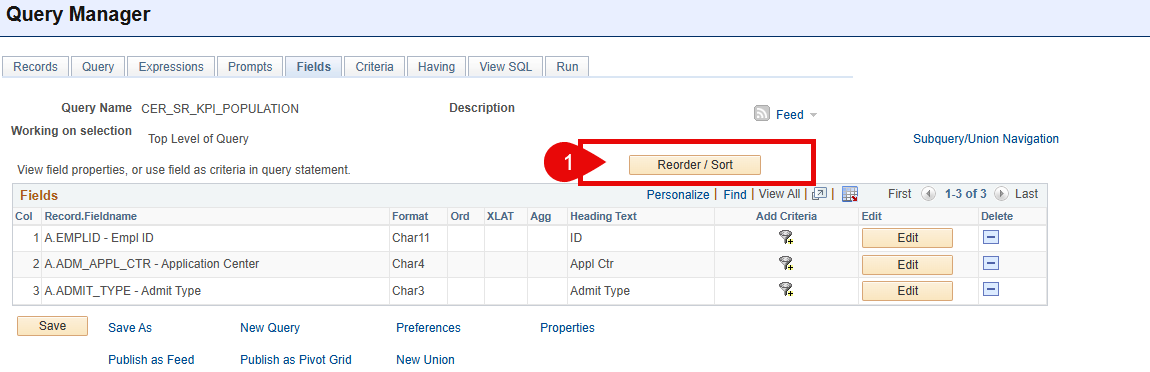
I may be over simplifying this, but have you used the 'Reorder/Sort' radio button on your "fields" tab within query manager? See below:

------------------------------
Juan Mercado
Systems Analyst
Cerritos College
------------------------------
Message from the HEUG Marketplace:------------------------------
Find, Review, and Engage with Higher Education-focused solution providers, products, and services using the
HEUG Marketplace.
------------------------------
Original Message:
Sent: 08-07-2025 08:43 AM
From: Stephen Forrest
Subject: Sort Help
Create an expression that assigns a number value to how you want to sort, then add it to the field list, and then sort on that column.
If you want class sections that start with 4 to sort first, and H to sort second, and 2 to sort third, for example, then
(Case
When A.CLASS_SECTION Like '4%' Then 1
When A.CLASS_SECTION Like 'H%' Then 2
When A.CLASS_SECTION Like '2%' Then 3
Else 4
End)
Stephen Forrest
Institutional Research Analyst the Third
University Decision Support
Enrollment Management Research Group
Office of the Provost
Southern Methodist University
sforrest@smu.edu
214-768-4015
"The only reason we put the data in, is to take the data out."